Remuda (Frontier MCP Registry)
Remuda is Federal Frontier’s MCP registry and router — unified tool routing for platform AI agents (Wanaku engine + Apache Camel).
Remuda is Federal Frontier’s MCP registry and router — the unified tool routing layer for platform AI agents. This page is the architecture deep dive for the capability previously titled Frontier MCP Registry. For the product introduction, see Remuda Overview.
Remuda is powered by Wanaku — the open-source Model Context Protocol router/registry engine (Red Hat Apache Camel team, Quarkus and Apache Camel). Prefer the product name Remuda in operator docs; Wanaku is the engine underneath.
Wanaku stands between autonomous AI agents and enterprise systems. Agents connect to a single MCP endpoint and discover all available tools, regardless of whether those tools are backed by native FFP-built MCP servers or Apache Camel routes connecting customer Systems of Record. From the agent’s perspective, every tool looks identical. The routing, authentication, and access control are invisible.
Two-Path Architecture
Path 1 — Native MCP Servers (FFP-built)
Federal Frontier Platform ships 16 purpose-built MCP servers covering the full federal infrastructure stack: Kubernetes, OpenStack (VitroAI), VMware, AWS, Ceph, Azure, Keycloak, ArgoCD, Gitea, Grafana, the Federal Frontier Ontology (FFO), Atlassian, Kolla, and Federal Compliance. These are registered as upstream proxies in Wanaku. Agents discover and invoke their tools through the single Remuda endpoint.
Path 2 — Customer SOR Integration via Apache Camel
Federal customers have existing Systems of Record — ServiceNow, vCenter, Splunk, SAP, IBM MQ, legacy CMDBs, mainframe systems — that contain authoritative data about their infrastructure. Where native MCP servers don’t exist, Apache Camel fills the gap. A Camel route is designed visually in Kaoto (VS Code extension), deployed to the Camel-K operator, and exposed as an MCP tool through a Wanaku rules file. Apache Camel provides 300+ enterprise connectors. An integration that would take weeks to build as a custom MCP server takes hours as a Camel route.
Token Efficiency
Pre-loading all tool definitions from 16 MCP servers into every agent session consumes approximately 37,500 input tokens per LLM call — roughly 80% of which are never used for any given task. Remuda enables on-demand tool loading: the dispatch controller selects only the MCP servers relevant to the current alert type, reducing tool definition tokens per call by 77% — approximately $12,600 per year in Bedrock inference savings per FFP installation.
Security
All MCP tool invocations are authenticated via Keycloak OIDC (realm: FAS). OPA/Rego policies enforce role-based access control on tool invocation. Wanaku’s namespace isolation ensures that tools registered for one classification level are not visible to agents operating at a different level. Tool and resource definitions persist in an embedded Infinispan data grid — no external database dependency.
Open Standards
Remuda is built entirely on open standards and open source: Model Context Protocol (Anthropic), Apache Camel (Apache Software Foundation), Wanaku (Red Hat / Apache Camel team), Quarkus, Keycloak, and OPA. No proprietary vendor lock-in at the integration layer.
Architecture

Operator Interface
Wanaku ships a web-based management console for browsing and managing every registered tool, resource, prompt, capability, namespace, and forward. Operators can inspect the full tool catalog across all 16 upstream MCP servers, view input schemas, and manage namespace assignments without touching the API directly.
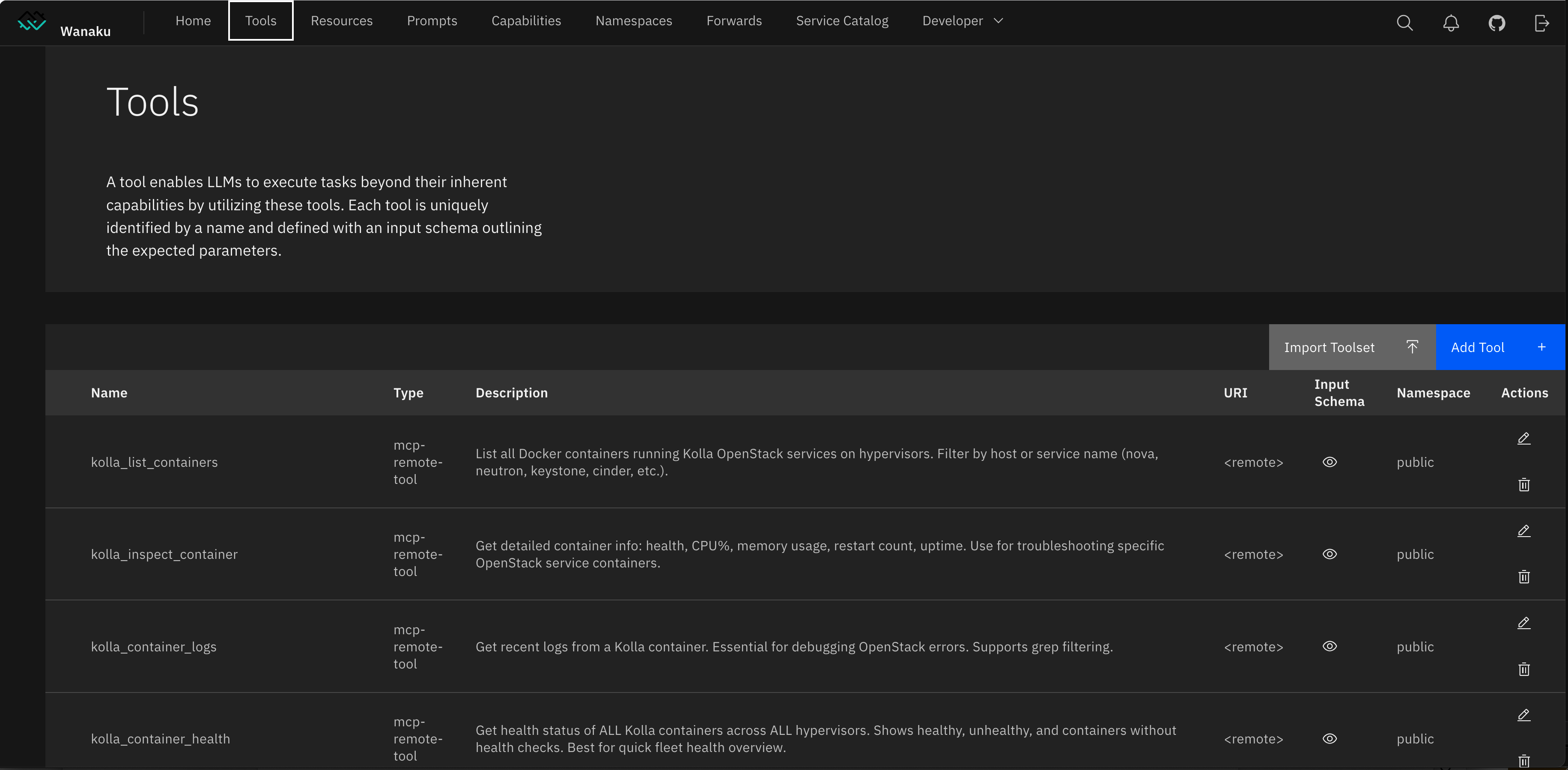 The Wanaku Tools tab showing Kolla OpenStack tools —
 kolla_list_containers, kolla_inspect_container, kolla_container_logs, kolla_container_health — registered as mcp-remote-tool forwards in the public namespace. Each tool carries its full description and input schema, visible to any agent that connects to the Frontier MCP Registry endpoint. The console also provides Import Toolset and Add Tool actions for manual tool registration.
The top navigation exposes all registry objects: Tools, Resources, Prompts, Capabilities, Namespaces, Forwards, Service Catalog, and a Developer menu for API exploration. The Forwards tab maps each of the 16 FFP MCP servers to their upstream mcp-proxy address. The Namespaces tab controls classification-level isolation — tools registered in one namespace are not discoverable by agents operating in another.