VDI Authentication
Single sign-on from OutpostAI to the desktop session via Guacamole and Keycloak OIDC. No second password prompt.
Frontier Workspace VDI delivers single sign-on from the OutpostAI operator portal to the desktop session. A user signs in to OutpostAI once via OIDC, clicks Connect on a workspace tile, and lands at the XFCE desktop. There is no second password prompt, no second login screen, and no separate credential the user has to manage.
This is the same SSO pattern delivered by Citrix, VMware Horizon, KASM Workspaces, and AWS WorkSpaces. FFP matches the user experience modern enterprise and federal customers expect.
Architecture
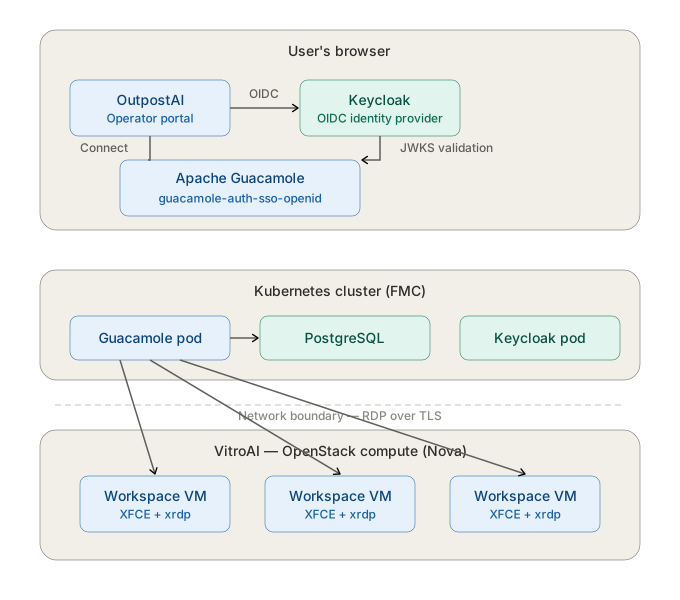
The browser tier handles user authentication via Keycloak OIDC. The Guacamole pod in the Kubernetes cluster validates the token via Keycloak’s JWKS endpoint and looks up platform-managed RDP credentials from the PostgreSQL database backend. The RDP connection crosses the network boundary to workspace VMs running on VitroAI’s OpenStack compute plane.
The flow
The connection flow has three steps, all of which happen behind a single click.
Step 1 — user signs in to OutpostAI. The user authenticates to OutpostAI through Keycloak using OIDC. This is the same identity the user uses for all platform operations: requesting workspaces, viewing dashboards, accessing the catalog. The Keycloak session established here carries the user through the rest of the flow.
Step 2 — user clicks Connect on a workspace tile. OutpostAI launches the user into Apache Guacamole, the connection broker, carrying the Keycloak session forward. Guacamole validates the OIDC token, identifies the user, and authorizes them to the specific workspace connection they requested.
Step 3 — Guacamole opens the desktop session. Guacamole establishes the RDP connection to the workspace VM using platform-managed credentials stored in its internal connection record. The user never sees these credentials, never types them, and never knows them. The desktop streams to the user’s browser and the user is working.
The whole flow takes a fraction of a second from the user’s perspective. Click, desktop.
Identity model
The platform separates two identity concerns cleanly.
User identity is handled by Keycloak via OIDC. The user proves who they are once at OutpostAI sign-in. The Keycloak token bears the user’s subject and roles. The token is what authorizes the user to specific workspaces, to administrative functions, and to other platform operations.
Connection credentials are handled by the platform. Each workspace has a per-workspace credential that authenticates the RDP session from Guacamole to the desktop VM. This credential is generated when the workspace is provisioned, stored in Guacamole’s connection record, and used by Guacamole on the user’s behalf. The user does not interact with this credential.
This separation is the right architectural shape because the user identity problem and the service-to-service authentication problem are different problems. The user identity problem is solved by OIDC. The service-to-service problem is solved by Guacamole’s internal credential management. Conflating them would produce a worse user experience for no security benefit.
What this gives you
One sign-on. The user authenticates once, at OutpostAI. Everything downstream — workspace catalog, request submission, desktop connection — uses that single Keycloak session.
No user-facing credentials for desktops. Users never see, type, or manage a desktop password. The platform handles the RDP-layer credential as platform-managed credential material, not user-facing authentication.
Compatible with existing identity infrastructure. Customers who federate Keycloak with their own identity provider (Active Directory, Okta, PingFederate, CAC/PIV) get the same SSO experience for VDI that they get for other federated applications. The OIDC flow is standard.
Federal-ready. This is the identity pattern federal evaluators expect from modern VDI products. OIDC at the user layer, vaulted credentials at the service layer, no user-facing static secrets for desktop access.
What is unchanged
The desktop VM image is unchanged from the perspective of this architecture. XFCE, xrdp, and the standard desktop tooling continue to work exactly as they did before. The deploy script that provisions workspaces is unchanged. The platform’s audit trail, authorization controls, and operational tooling all continue to operate as before.
The change is in how the user enters the desktop — through OIDC SSO instead of a password prompt — not in what the desktop is or how it is built.
Guacamole OIDC extension
The SSO flow is implemented by the guacamole-auth-sso-openid extension, which is part of the Apache Guacamole SSO package. This extension implements the OpenID Connect implicit flow and delegates user authentication to Keycloak. It provides authentication only — connection records and authorization are managed by a database backend (PostgreSQL in FFP deployments).
The extension requires five configuration properties, all of which are derived from the Keycloak realm’s OIDC discovery endpoint:
| Property | Source |
|---|---|
| openid-authorization-endpoint | Keycloak authorization_endpoint |
| openid-jwks-endpoint | Keycloak jwks_uri |
| openid-issuer | Keycloak issuer |
| openid-client-id | Registered Guacamole client in Keycloak |
| openid-redirect-uri | Public URL of the Guacamole web application |
For containerized deployments, these map to environment variables (OPENID_AUTHORIZATION_ENDPOINT, OPENID_JWKS_ENDPOINT, etc.) on the Guacamole container.
The openid-username-claim-type property controls which JWT claim is used as the Guacamole username. The default is email. Federal deployments that use CAC/PIV authentication through Keycloak may override this to match the claim that carries the user’s identity (such as preferred_username or a custom claim).
For full configuration reference, see the Apache Guacamole OpenID Connect documentation.