OutpostAI — Mission Control and Human-in-the-Loop Dispatch
OutpostAI is the operator interface for the Federal Frontier Platform. The Dispatches tab provides human-in-the-loop approval for autonomous SRE agents, connecting Grafana alerts to Claude Code remediation through a governed dispatch pipeline.
OutpostAI — Mission Control and Human-in-the-Loop Dispatch
OutpostAI is the operator GUI for the Federal Frontier Platform. It provides mission orchestration (TrailbossAI), cluster management, compliance workflows, the Chat Assistant for conversational infrastructure management, the multi-hyperscaler cluster creation wizard, and the SRE Dispatches panel for human-in-the-loop (HIL) governance of autonomous infrastructure agents.
Multi-Hyperscaler Cluster Creation
The Clusters tab includes a four-step wizard that provisions Kubernetes workload clusters across all four supported hyperscalers via the Cluster Template System:
| Provider | CAPI provider | K8s distribution |
|---|---|---|
| OpenStack (VitroAI) | CAPO | RKE2 on Nova VMs |
| AWS | CAPA | EKS managed control plane |
| Azure | CAPZ | AKS managed control plane |
| Oracle Cloud | CAPOCI | OKE managed control plane |
The wizard’s Step 2 (Infrastructure) is schema-driven — when an operator selects a provider, the wizard fetches the available templates from GET /api/v1/cluster-templates?provider=<x>, then renders form fields dynamically from the chosen template’s JSON Schema. Adding a new hyperscaler is a Postgres template insert on the backend; the wizard auto-discovers it with no frontend code changes. Kubernetes versions span v1.30 → v1.34 for every provider.
Step 3 (Add-ons) uses a drag-and-drop catalog with a Monaco YAML editor for per-add-on values.yaml customization. The Cinder CSI add-on is the default storage option for OpenStack/Vitro clusters (Cinder is the controller, Ceph RBD is the backend) — see Storage Architecture for the rationale.
Step 4 (Review) shows the chosen template name, version, and a JSON dump of every input value the operator supplied. Clicking Create Cluster calls the render-and-push endpoint, which validates inputs against the JSON Schema, renders the Jinja2 template, writes the manifests to Gitea, and ArgoCD syncs them to the FMC where the appropriate CAPI provider takes over.
Access: https://outpostai.vitro.lan — Keycloak OIDC authentication (FAS realm, CAC-capable).
Chat Assistant
The Chat Assistant tab provides a conversational AI interface powered by AWS Bedrock (Claude Sonnet 4.6 / Opus 4.6) with access to 150+ MCP tools across 13 servers. Operators can query infrastructure, manage resources, and dispatch Claude Code agents to write and deploy code — all from natural language.
Key capabilities:
- Infrastructure queries — “What’s the Ceph health?”, “List all VMs in ERROR state”, “Show ArgoCD apps out of sync”
- Infrastructure actions — “Restart the compass-api deployment”, “Drain node texas-dell-04”, “Create a Jira ticket for…”
- Code and deploy — “Fix the CORS bug in openstack-mcp-server and open a PR” (dispatches a Claude Code K8s Job)
- Model switching — operators select Sonnet (fast), Opus (deep reasoning), or Ollama (edge) from the dropdown
The Chat Assistant uses the unified chat module which provides an agentic loop — the LLM autonomously decides which tools to call, executes them, interprets results, and either calls more tools or responds. Up to 10 iterations per request.
See Unified Chat for full architecture details, tool catalog, and Claude Code dispatch documentation.
SRE Dispatches Panel
The Dispatches tab is the human control plane for the autonomous SRE dispatch loop. When Grafana Alertmanager fires an alert and the Dispatch Controller classifies it as MEDIUM or HIGH risk, the dispatch pauses here for human approval before a Claude Code agent is spawned.
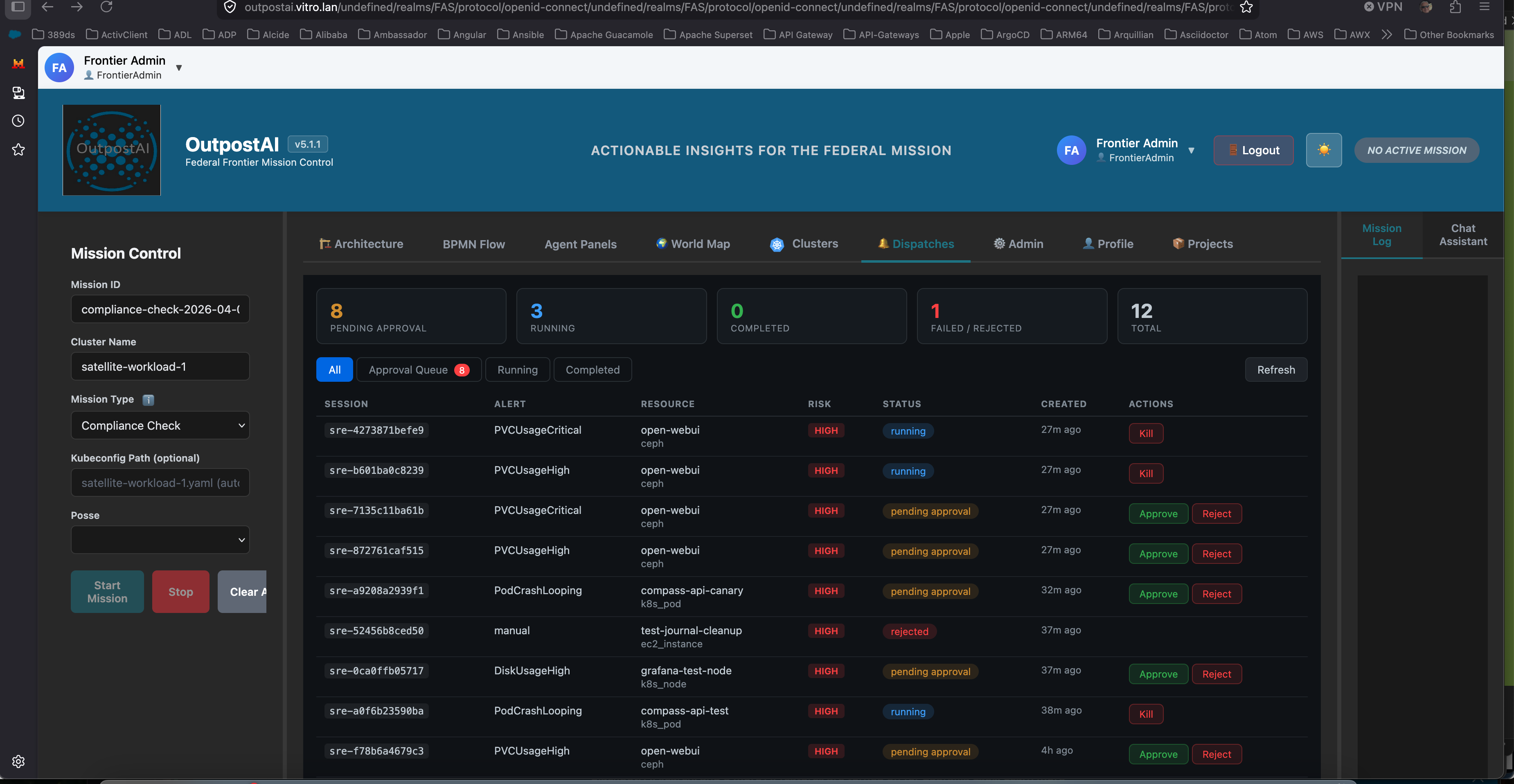 The Dispatches panel showing 8 sessions pending approval, 3 running Claude Code agents, and 12 total sessions. Real alerts from Prometheus — PVCUsageCritical on open-webui (Ceph storage), PodCrashLooping on compass-api-canary, DiskUsageHigh. Each pending session has Approve and Reject buttons. Running sessions have a Kill button.
What the Operator Sees
The panel displays five stat cards at the top:
| Stat | Meaning |
|---|---|
| Pending Approval | Alerts classified as MEDIUM or HIGH risk that require human authorization before an agent is dispatched |
| Running | Claude Code agents currently executing in Kubernetes Jobs |
| Completed | Sessions where the agent finished investigation/remediation successfully |
| Failed / Rejected | Sessions that failed, were rejected by an operator, or were killed |
| Total | All sessions across all states |
Below the stats, a filterable table shows every dispatch session with:
- Session ID — unique identifier linking the alert to the K8s Job, FFO write-back, and Jira ticket
- Alert — the Prometheus alert name (PVCUsageCritical, PodCrashLooping, DiskUsageHigh, etc.)
- Resource — the affected infrastructure (PVC name, pod name, node) and resource type (ceph, k8s_pod, k8s_node)
- Risk — the OPA-evaluated risk level (LOW, MEDIUM, HIGH, CRITICAL)
- Status — current state (pending approval, running, completed, failed, rejected, killed)
- Created — how long ago the alert was received
- Actions — Approve/Reject for pending sessions, Kill for running sessions
Approval Workflow
When an operator clicks Approve, the Dispatch Controller:
- Creates a Kubernetes Job running Claude Code (
claude-runnercontainer) - Passes the rendered prompt with alert context, FFO entity relationships, and severity-appropriate instructions
- The agent connects to the full MCP tool surface (13 servers, 153+ tools) via Bedrock inference
- Investigates the alert, takes remediation action (or documents findings), creates a Jira ticket
- Writes the outcome back to the FFO knowledge graph
When an operator clicks Reject, the session is marked as rejected with the operator’s reason. No agent is dispatched. The alert is still recorded for audit purposes.
When an operator clicks Kill on a running session, the Kubernetes Job is terminated immediately.
Session Detail
Clicking any row opens a detail overlay showing:
- Full alert description and raw Alertmanager payload
- The rendered prompt that was (or would be) sent to Claude Code
- Claude Code output (for completed sessions)
- Remediation outcome, root cause analysis, and Jira ticket link
- Approve/Reject/Kill actions depending on session state
Risk Classification and the Approval Gate
Not all alerts require human approval. The OPA risk policy classifies each alert:
| Risk Level | Behavior | Human Involvement |
|---|---|---|
| LOW | Agent dispatched immediately — no approval needed | Post-mortem review only |
| MEDIUM | Session created in pending_approval state | Operator must approve before agent runs |
| HIGH | Session created in pending_approval state | Operator must approve; agent investigates only, does not remediate |
| CRITICAL | Dispatch rejected entirely | Alert routed to on-call via Alertmanager |
LOW risk operations (log cleanup, journal vacuuming, non-production restarts, cache invalidation) bypass the approval queue and execute autonomously. The operator reads the post-mortem in the morning.
MEDIUM and HIGH risk operations (production service restarts, Ceph storage issues, configuration changes, cross-domain operations) appear in the Dispatches panel and wait for human authorization. This is the human-on-the-loop model — agents operate autonomously within policy bounds, humans approve at gates.
Architecture
/alertmanager] DC --> OPA[OPA Risk Eval] DC --> DB[(PostgreSQL
dispatch_sessions)] DB --> TB[Trailboss API
/api/v2/dispatch/*] TB --> UI[OutpostAI
Dispatches Tab] UI -->|Approve| TB TB -->|approve| DC DC --> Job[Claude Code Job
K8s Job] style Prom fill:#553c9a,stroke:#805ad5,color:#e2e8f0 style AM fill:#c53030,stroke:#fc8181,color:#fff style DC fill:#2d3748,stroke:#4299e1,color:#e2e8f0 style OPA fill:#553c9a,stroke:#805ad5,color:#e2e8f0 style DB fill:#2d3748,stroke:#4299e1,color:#e2e8f0 style TB fill:#2d3748,stroke:#4299e1,color:#e2e8f0 style UI fill:#2b6cb0,stroke:#4299e1,color:#fff style Job fill:#2b6cb0,stroke:#4299e1,color:#fff
The data flow:
- Prometheus evaluates alert rules (PVC usage, pod crashes, node pressure)
- Alertmanager routes firing alerts to the Dispatch Controller’s
/alertmanagerwebhook - Dispatch Controller translates the Alertmanager payload into an
SREEvent, evaluates risk via OPA, fetches FFO context, renders a severity-appropriate prompt, and creates a session in PostgreSQL - Trailboss API proxies the
/api/v2/dispatch/*endpoints with Keycloak OIDC authentication and RBAC - OutpostAI Dispatches tab polls the sessions API every 10 seconds and displays the approval queue
- Operator reviews the alert context and clicks Approve or Reject
- Dispatch Controller creates the K8s Job (on approval) and tracks the session through completion
- Claude Code investigates, remediates, writes outcome to FFO, creates Jira ticket
Technology Stack
| Component | Technology | Location |
|---|---|---|
| OutpostAI Frontend | Vue 3, Vite, Tailwind CSS | f3iai namespace, outpostai-frontend deployment |
| Trailboss API | Python FastAPI (TrailbossAI orchestrator) | f3iai namespace, frontier-cluster-api deployment |
| Unified Chat Module | Python — Bedrock + MCP tools + agentic loop | Embedded in Trailboss API (unified_chat.py) |
| Chat LLM | AWS Bedrock (Claude Sonnet/Opus 4.6) + Ollama fallback | Bedrock VPC PrivateLink / local Ollama |
| MCP Tool Surface | 13 MCP servers, 150+ tools via JSON-RPC | f3iai namespace, ClusterIP services |
| Dispatch Controller | Python FastAPI | f3iai namespace, sre-dispatch deployment |
| Session Storage | PostgreSQL (dispatch_sessions table) |
f3iai namespace, shared with Compass |
| Authentication | Keycloak OIDC (FAS realm, federal-frontier client) |
keycloak namespace |
| Monitoring | Prometheus + Grafana + Alertmanager | monitoring namespace |
OutpostAI’s frontend uses BlueprintJS as its component library, shared with Compass. For component conventions and design system documentation, see FFP UI Design System.
Resilience: Reconciliation and Deduplication
Two failure modes were identified during overnight validation and addressed in v2.6.0:
Orphaned Sessions
When the Dispatch Controller restarts (deployment updates, pod eviction, crashes), any in-flight background tasks that are tracking running K8s Jobs are killed. Sessions in running state become orphaned — the Job completes or times out, but nobody updates the session record.
Fix (v2.6.0): On startup, the Dispatch Controller runs a reconciliation loop:
- Queries for all sessions with
status='running' - For each, checks if the corresponding K8s Job still exists via the Kubernetes API
- If the Job completed successfully — captures logs, parses the outcome, updates the session to
completed - If the Job failed — marks the session as
failed - If the Job is gone (TTL expired) — marks the session as
failedwith reason “orphaned - job expired during controller restart”
This ensures the Dispatches panel never shows stale “running” sessions after a controller restart.
Alert Deduplication
Alertmanager fires alerts on a repeat_interval (4 hours by default). Without deduplication, every repeat creates a new session in the approval queue for the same alert on the same resource. During overnight validation, 22 duplicate sessions accumulated for the same PVCUsageCritical alert on open-webui.
Fix (v2.6.0): Before creating a new session, the Dispatch Controller checks if an active session (pending or running) already exists for the same alertname + resource_id combination. If so, it returns the existing session ID with a deduplicated status instead of creating a new one. Operators see one session per unique alert, not one per repeat interval.
Validated April 2-3, 2026
The end-to-end dispatch loop was validated with real Prometheus alerts:
- PVCUsageCritical and PVCUsageHigh on
open-webuiPVC (99% full) — real alerts fromkubelet_volume_statsmetrics - PodCrashLooping on
compass-api-canary— test alert simulating pod restart loop - DiskUsageHigh on
grafana-test-node— test alert simulating journal log accumulation - All alerts correctly classified as HIGH risk by OPA (Ceph resource type and pod crash patterns)
- All sessions visible in OutpostAI Dispatches panel with Approve/Reject/Kill actions
- Approved sessions successfully spawned Claude Code Jobs with Bedrock inference
- Overnight soak test confirmed deduplication prevents approval queue flooding
- Controller restart confirmed reconciliation correctly resolves orphaned sessions