VMware to OpenStack Migration
Intelligent VMware migration backed by a living digital twin — topology-aware planning, near-zero downtime execution, and continuous compliance throughout.
VMware to OpenStack Migration
The Federal Frontier Platform provides intelligent VMware-to-OpenStack migration that goes far beyond lift-and-shift. Before a single VM moves, your entire VMware environment — VMs, networks, clusters, datastores, dependencies — is mapped into the FFO knowledge graph. During migration, every state transition is tracked in real time. After migration, the same platform manages your new OpenStack environment with continuous compliance evidence throughout.
Why FFP for Migration
Traditional migration tools move VMs from point A to point B. FFP understands why those VMs exist, how they relate to each other, and what compliance posture must be maintained throughout the move.
| Capability | Traditional Tools | Federal Frontier Platform |
|---|---|---|
| Pre-migration assessment | Manual spreadsheet inventory | Automated discovery via VMware MCP server, mapped into the FFO digital twin |
| Network mapping | Manual port group ↔ subnet mapping | Automated mapping of VMware port groups to OpenStack Neutron networks, with gaps surfaced for review |
| Wave planning | Manual grouping by guesswork | Dependency-aware wave planning via the FFO knowledge graph — databases before app servers, shared storage before consumers |
| Execution | CLI scripts or proprietary GUIs | AI agent-driven execution via MCP tools, observable from the Migration Monitor dashboard |
| Compliance | Post-migration audit scramble | Continuous ATO evidence — every state transition is tracked, the authorization boundary never changes |
| Post-migration | Different tool for different environment | Same platform manages OpenStack with the same agents, same MCP tools, same knowledge graph |
Migration Approaches
Warm Migration (Near-Zero Downtime)
For production workloads where downtime must be minimized. The migration engine uses Changed Block Tracking (CBT) to pre-copy disk data while the VM continues running on VMware. Once the bulk copy is complete, a brief cutover window (typically seconds) handles the final delta sync, powers off the source, and boots the target on OpenStack.
The Migration Monitor dashboard shows this in real time: VMs stay running (green) during the pre-copy phase, flash briefly to amber during cutover, then appear running on OpenStack.
Cold Migration
For non-critical workloads or maintenance windows. The VM is powered off, disks are transferred, converted for KVM, and the instance is booted on OpenStack. Simpler, no CBT dependency, works with any vCenter version.
How It Works
Each component of the Federal Frontier Platform plays a role in migration:
-
FFO (Federal Frontier Ontology) — The living digital twin tracks every entity and relationship in both VMware and OpenStack environments. Migration state transitions (planned → pre-copying → cutover → completed) are persisted as auditable entities.
-
VMware MCP Server — 8 tools providing read/write access to your vCenter: VM inventory, power state management, host and cluster topology, network and datastore enumeration.
-
OpenStack MCP Server — 54 tools providing full CRUD across Nova (compute), Neutron (networking), Glance (images), Cinder (block storage), and Keystone (identity). Includes ORC GitOps tools for declarative resource management.
-
Migration Engine — Single-VM migration tool using open-source tooling (nbdkit, libnbd, virt-v2v, qemu-img). Zero proprietary dependencies in the default configuration. Optional VDDK integration for customers who have it.
-
InfrastructureAI Agents — Scout monitors both environments continuously. Sage plans migration waves using FFO dependency data. Wrangler executes migration operations via MCP tools. All agent actions are observable and auditable.
-
Migration Monitor Dashboard — Real-time split-pane visualization showing VMware inventory shrinking on the left and OpenStack inventory growing on the right, with per-VM progress tracking and flavor matching display.
Migration Monitor Dashboard
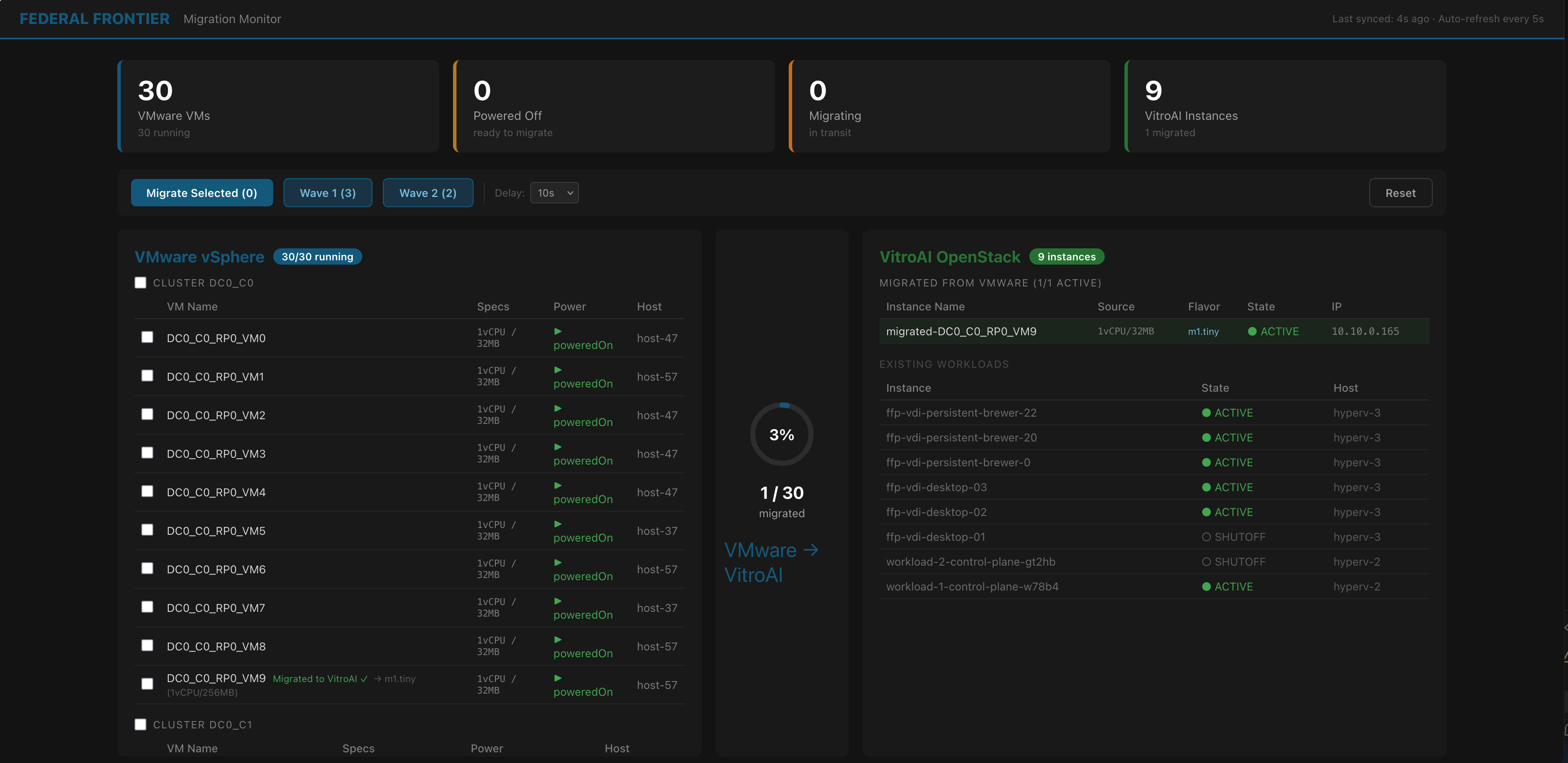
The Migration Monitor shows VMware inventory (left) and OpenStack inventory (right) with real-time migration progress. VMs stay running during pre-copy, with a brief cutover window before appearing on the target environment.
Getting Started
- Migration Architecture — Understand the technical pipeline from VMware to OpenStack
- Migration Monitor Dashboard — The real-time visualization and control interface
- Migration MCP Tools — Reference for the MCP tools used during migration